Real-Time News Data Collection using Python
As a Data Scientist, having the ability to collect, process, and analyze live news data is a seriously valuable skill. It covers everything from querying live news APIs to extracting and storing the data. So, if you want to learn about collecting real-time news data, this article is for you. In this article, I’ll take you through the task of real-time news data collection using Python.
Real-Time News Data Collection using Python
Before you begin, make sure you have:
- Your NewsAPI key (get it for free at newsapi.org)
- The following Python libraries:
pip install dotenv wordcloud
Step 1: Fetch Live News Using NewsAPI
Let’s set up our script. Most of the data professionals use NewsAPI because it gives them programmatic access to news from thousands of sources. Think of it as a news search engine.
Here’s the function we can use to fetch news headlines:
import requests
import pandas as pd
from datetime import datetime, timedelta
from dotenv import load_dotenv
import os

# load API key from .env file
load_dotenv()
API_KEY = os.getenv("your api key")

# dates for the last 2 days
to_date = datetime.utcnow().date()
from_date = to_date - timedelta(days=2)

QUERY = 'India Pakistan war OR conflict OR border OR attack OR tension'
LANG = 'en'
PAGE_SIZE = 100  # max per page

def fetch_news(query, from_date, to_date, api_key, page_size=100):
    url = 'https://newsapi.org/v2/everything'
    all_articles = []
    for page in range(1, 6):  # try up to 5 pages
        params = {
            'q': query,
            'from': from_date,
            'to': to_date,
            'language': LANG,
            'pageSize': page_size,
            'page': page,
            'sortBy': 'publishedAt',
            'apiKey': api_key
        }
        response = requests.get(url, params=params)
        data = response.json()

        if data.get("status") != "ok":
            print("Error:", data.get("message"))
            break

        articles = data.get("articles", [])
        if not articles:
            break
        all_articles.extend(articles)
    return all_articles
Here, we are querying up to 500 articles from the past two days. As a student, you can only use the free API, which gives you access to up to 100 news articles.
Step 2: Store the News Articles in a CSV
Now, we will convert the API output into a structured format (a DataFrame) and save it in a way that can be used for analysis:
# fetch articles
articles = fetch_news(QUERY, from_date.isoformat(), to_date.isoformat(), API_KEY)

# convert to dataframe
df = pd.DataFrame([{
    'title': article['title'],
    'description': article['description'],
    'source': article['source']['name'],
    'published_at': article['publishedAt'],
    'url': article['url'],
    'content': article['content']
} for article in articles])

# save to CSV
df.to_csv("india_pakistan_conflict_news.csv", index=False)
print(f"{len(df)} articles saved to 'india_pakistan_conflict_news.csv'")
At this point, we’ve successfully built a pipeline that pulls in structured news data on demand. If you want to automate this, you can schedule it with Python’s schedule module.
Step 3: Visualizing the Headlines with a Word Cloud
One of my favourite ways to quickly gauge what a collection of articles is about is with a word cloud. Here’s how you can generate one using titles and descriptions:
from wordcloud import WordCloud
import matplotlib.pyplot as plt

# combine title and description text for word cloud
text_data = df['title'].fillna('') + ' ' + df['description'].fillna('')
combined_text = ' '.join(text_data.tolist())

# generate word cloud
wordcloud = WordCloud(width=1000, height=500, background_color='white', collocations=False).generate(combined_text)

plt.figure(figsize=(12, 6))
plt.imshow(wordcloud, interpolation='bilinear')
plt.axis('off')
plt.title("Word Cloud of News Headlines and Descriptions", fontsize=16)
plt.show()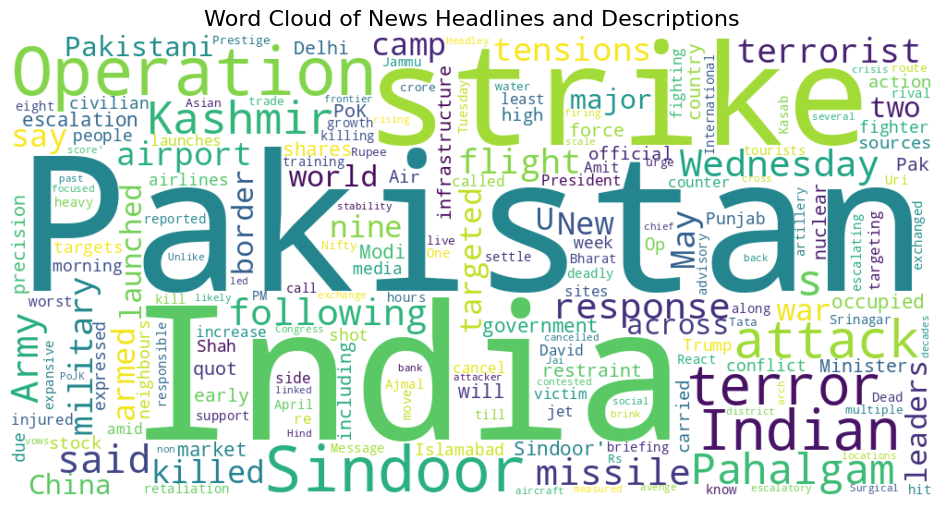
Building tools like this not only sharpens your data collection skills but also prepares you for advanced projects in NLP, dashboards, or even ML-powered event prediction systems.